

If your business needs five pages, a few photos and an enquiry form, I wouldn’t automatically recommend WordPress. I wouldn’t automatically recommend a custom build either.
Sometimes Wix or Squarespace is enough. There is no reason to pay an agency just to turn five basic pages into five more expensive pages.
The harder question is what you need those pages to do.
Which website builder is best in New Zealand? For a simple DIY business website, start with Wix or Squarespace. For a product-led online shop, compare Shopify. WordPress suits flexible content and custom workflows when someone will maintain it; Webflow suits designer-led sites. A lightweight AI-assisted custom build is another option when a developer will own the code and support. The best choice depends on your customers, editing needs and ongoing responsibilities, not the longest feature list.
What this comparison is based on
I’m Charlie Chao, founder of Kiwi Web Design in Auckland. I’ve personally built or edited sites using Wix, Squarespace, Shopify, WordPress and Webflow, as well as AI-assisted custom development. The recommendations here draw on that experience, including the scaffolding project below, recorded in an interview for this article on 26 October 2026.
I also checked the providers’ current documentation for details such as hosting, exports and NZ payments. Rocketspark is included as an NZ option based on that documentation, not a claim that I’ve used it personally. This is a practical comparison, not a controlled speed test or a scored ranking of identical demo sites.
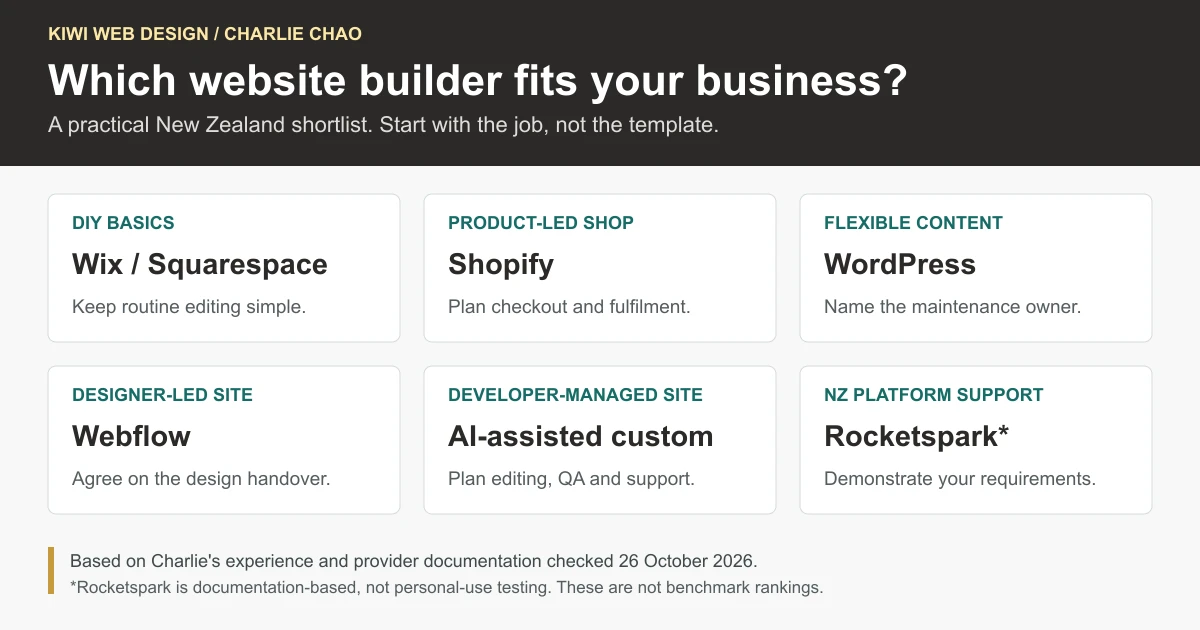
My shortlist for a small NZ business
| Option | Where I would consider it | The trade-off to understand |
|---|---|---|
| Wix | A straightforward website the owner wants to build and update | Custom requirements can add development work; the running site stays on Wix |
| Squarespace | A small service site, consultant’s website or portfolio | A specific layout or unusual feature may be awkward to deliver |
| Shopify | A business whose daily work involves products, orders and delivery | Subscriptions, apps and customisation can be unnecessary overhead for a basic service site |
| Self-hosted WordPress | Growing service content, publishing and tailored workflows | Hosting, plugins, updates and recovery need a responsible owner |
| Webflow | A visually distinctive website with a designer involved | The learning curve and design handover need planning |
| AI-assisted custom build | A focused site with a developer managing the build and support | Content editing, code quality and developer dependency must be addressed |
| Rocketspark | An NZ business that values NZ-based platform support | Demonstrate the exact integrations and clarify the exit arrangements first |
One distinction before going further: a hosted builder and a development method are not the same thing. Wix and Squarespace are hosted platforms. Self-hosted WordPress needs a hosting arrangement. AI-assisted development means using coding tools to build a site; it doesn’t automatically give you hosting, a CMS or a support service.
Wix: a sensible place to start, with some limits to plan around
What I like about Wix is that an owner can get started without needing to understand hosting or write code. For a new business getting most of its work through referrals, that can be exactly the right level of commitment.
The frustration usually appears when the brief moves beyond the standard tools. A request that sounds small to a client can turn into a workaround, an app or custom development. That is where I would stop and compare the options again.
That doesn’t mean Wix cannot do custom work. Wix’s developer documentation describes frontend code, backend logic and integrations. The question is whether that route makes sense for the particular scope and the person maintaining it.
There are useful SEO settings, too. Dismissing Wix as a platform that cannot rank would be misleading.
The clearer limitation is portability: Wix says its sites must run on Wix’s servers. Keeping your domain and your content doesn’t mean you can move the complete working site to another host.
Squarespace: good-looking basics, provided the brief stays straightforward
Squarespace is one of the options I would show a consultant, photographer or small service business that wants a tidy site without much technical administration. Its templates can give you a professional starting point, and ordinary content changes are manageable.
I find it less comfortable when a client has a very particular layout or a feature that doesn’t fit the available tools. Some editing tasks also take more effort than the finished simplicity suggests.
Before choosing it, replace the demo content with your own. Does the layout still work with your longest service name, your actual photos and the information a customer needs? A beautiful sample homepage isn’t much help if your real content doesn’t fit.
Also understand the exit route. Squarespace’s export guide describes exporting certain content, not a full copy of every design and feature. Moving platforms can involve rebuilding parts of the site.
Shopify: choose it for the shop, not just the homepage
If the business sells products, I would normally put Shopify on the shortlist early. Inventory, payments, orders and shipping are part of the everyday job, rather than extras bolted onto a service website.
That’s the appeal in my experience: the store operations have a place to live. It can also grow with a retailer whose catalogue and order workload expand.
What catches owners is the total commitment. There may be paid apps, ongoing subscriptions, payment-related fees and development work for a particular change. For a basic service business with no real retail operation, I usually wouldn’t choose Shopify just to get some pages online.
Shopify Payments is available in New Zealand, subject to eligibility and verification. Still check the exact checkout and delivery requirements. A store selling a few locally collected products has a different brief from one shipping nationwide with rural surcharges.
Ask about backups and moving on, too. Shopify documents CSV exports and theme downloads, but those are not a portable replacement for its checkout and app services.
WordPress: flexibility is useful only if someone looks after it
WordPress is a strong option when a business needs more control over content and functionality. Service pages, articles, custom forms and integrations can fit well. It gives us room to work rather than forcing every request into a fixed template.
That flexibility is why I still recommend it for suitable projects. It is also why I don’t recommend it automatically.
Plugin conflicts, updates, hosting and security all need attention. A poorly assembled WordPress site can become slow and difficult to maintain. Adding another plugin is not always the best answer to the next request.
The proposal should say who handles updates, backups, recovery and form checks. It should also say what the owner can edit without help. Our WordPress suitability guide covers those responsibilities in more detail.
Here I mean self-hosted WordPress, not automatically WordPress.com. WordPress.com’s own comparison explains the difference between its managed hosting service and running the WordPress software with another host.
A real Auckland example: when a basic Wix site was no longer the right fit
An Auckland scaffolding company came to us with an existing Wix website. It had served as a basic online presence, but the new brief was more demanding.
They wanted customers to request an estimate using scaffolding dimensions, hire duration and delivery location. They also wanted a better mobile experience, an enquiry and booking pathway, and more flexibility for future changes.
Their existing setup wasn’t meeting that brief. We recommended a WordPress rebuild with a customised calculator and enquiry form.
An important part of the decision was not to treat the estimate as an automatically confirmed booking. Customers could send the job information online; the owner could review it and confirm the details. That kept a person involved where the job needed judgement.
The client accepted the proposal and we launched the new website. That is the outcome I can report here. I’m not attaching an unmeasured increase in enquiries or sales to the platform change.
The lesson isn’t that every growing business must leave Wix. It is that a platform decision should be revisited when the requirements change. For this project, the content, calculator, support and future maintenance together made WordPress our recommendation.
For other examples of how requirements change the answer, see our four-project platform decision log.
Webflow: design control, with a handover question
I like Webflow for design-intensive work. It offers room to create distinctive layouts, animations and responsive designs without treating every page as a variation of the same template.
The challenge is the learning curve. A client being able to replace some text isn’t the same as being comfortable changing the design. If the owner expects to rearrange layouts themselves, I would demonstrate that task before agreeing to the build.
More complex business functionality can need additional services or development. And although Webflow offers code export on qualifying paid Workspace plans, its documentation makes clear that hosted functions such as the CMS, checkout and form processing do not move as a complete working system with the exported code.
For a designer-led site, that may be a reasonable trade-off. It just needs to be understood at the start.
AI-assisted custom development: another route, not an automatic upgrade
AI coding tools have changed how I approach some small-business builds. They can help with production work and give us more freedom to create a focused website without depending on a large collection of templates and plugins.
For a simple service business that wants professional help, a lightweight AI-assisted custom build can be a good option. The aim is a clear offer, mobile-friendly pages, sensible SEO foundations and a reliable way to enquire. Fast loading is a design and implementation goal, not something I would promise just because AI helped write the code.
The less glamorous work remains: testing, debugging, security review, deployment and ongoing support. If there is no CMS, a client may need a developer for ordinary text changes. Flexible hosting is useful; an undocumented codebase nobody else can maintain is not.
Our AI-assisted build log records the workflow and defects we have had to correct. We haven’t run a controlled manual-versus-AI build benchmark, so I don’t claim a particular percentage saving.
I would put the editing arrangement in the scope before choosing this route: a CMS, another agreed editing workflow, or developer-managed changes. The client should know which one they are getting.
An NZ-made option to compare: Rocketspark
If local platform support matters to you, include Rocketspark in the conversation. Its NZ service information describes a DIY option, a design-partner option, and NZ-based phone and email support.
I haven’t included it as a personal-use review. Its place here comes from the provider documentation checked for this guide.
Ask for a demonstration of your actual form, booking or store requirements, and get an explanation of what happens if you leave. Its published features are a starting point for that conversation, not proof that every integration will match your business process.
When I would tell you DIY is enough
If you’re starting out, have a limited budget and mainly get work through referrals, a simple Wix or Squarespace site may do the job well. Show your services, use real photos, make the contact details obvious and keep the information up to date.
I wouldn’t try to turn that into an agency project just because we build websites.
Professional help becomes more valuable when you need someone to work through search demand, content, trust signals, enquiry flow and measurement, or you simply don’t have time to do it yourself. That work can improve a suitable hosted-builder site too. Hiring an agency doesn’t automatically mean changing the platform.
As I put it when discussing this comparison:
“Recommend the simplest solution that meets the client’s business goals, even when that means DIY is the better option.”
Five checks before you commit
Try these with the actual person who will look after the website. These are tasks for your shortlist, not results from a test we ran across all the platforms.
- Make a real page. Use your own service description, photos and longest headings. Look at it on a phone.
- Make an ordinary update. Replace a photo, change opening hours and add a service. Can the owner do it confidently?
- Follow an enquiry. Send a test message and check what arrives. A success message alone doesn’t show that the owner received all the details.
- Check the awkward requirement. A booking rule, delivery zone, file upload or custom estimate is more useful to demonstrate than another standard page.
- Ask how you leave. Confirm domain access, available exports, paid licences and the parts that would need rebuilding.
You can download our builder-comparison worksheet to record the plan, date, evidence and unanswered questions. There are no preset scores: “included”, “needs a paid app” and “needs a developer” are different answers worth keeping.
For an NZ store, add checks for NZD checkout, merchant eligibility, shipping regions and rural delivery. Check whether the accounting or stock connection supports your exact process. Squarespace, for example, currently lists New Zealand for Squarespace Payments; still confirm eligibility and the methods available to your business.
For any platform, separate the domain, hosting or subscription, email, apps, maintenance and support. Compare the ongoing obligations, billing currency and renewal terms, not only the first payment.
Which website builder is best for SEO and AI search?
There isn’t a builder that supplies Google rankings or AI citations with the subscription. Look for the controls you need, then judge the website you actually publish: useful content, crawlable pages, sound internal links, a good mobile experience and evidence that supports the claims.
Google’s generative-AI search guidance emphasises original, useful material and the usual search foundations. It doesn’t require special AI text files or a special schema to make a page eligible. Indexing and visibility are not guaranteed. If you want a specialist to look at your search and AI visibility rather than your builder, our AI SEO service starts with an audit.
That is why I wouldn’t move a working site just because someone says another builder is “better for SEO”. Identify the problem first. Missing service content, weak evidence and a broken enquiry form don’t become good simply because they sit on a different platform.
A few common questions
What is the best website builder for a small business in NZ?
For a straightforward DIY presence, I would compare Wix and Squarespace first. For an online shop, include Shopify. WordPress, Webflow and AI-assisted custom development suit different professional-build requirements; maintenance and editing arrangements matter as much as the initial design. Rocketspark is also worth researching if NZ-based support is a priority.
Should a small business use WordPress or Wix?
Wix can be enough for an owner-managed, straightforward site. Self-hosted WordPress offers more flexibility in content and implementation, but somebody must manage hosting, updates and backups. Decide from the actual requirements rather than assuming WordPress is always an upgrade.
Can I keep my domain if I change website builders?
Check who controls the domain registration and DNS. The domain and the website are separate arrangements. Keeping the address doesn’t guarantee that the design, forms, CMS or checkout can move unchanged.
Is an AI-built website ready to use straight away?
Not just because the preview looks finished. Someone still needs to check the claims, mobile layout, forms, accessibility, security, tracking and deployment. Agree on content editing and support before treating the build as complete.
The platform should make the business easier to run, not give it a new technical problem. If you’re unsure where your requirements fit, talk to Kiwi Web Design. And if the question is who should do the work, rather than which software to choose, our DIY builder, freelancer or agency guide tackles that separately.